


📦 The Situation: A Rack That Was Running a Little… Toasty
Today I received a fresh hardware upgrade for my rack. Not a new server. Not a faster switch.
Something arguably more important: thermal sanity.
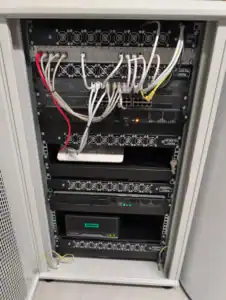
Over the past few months I’ve been slightly unsettled by the temperature development inside my cabinet —
especially during peak summer heat waves.
The servers themselves are actively cooled, of course. Their internal airflow is doing its job.
The switches?
Not so much. At least not the specific models I’m running.
When all three servers were powered on simultaneously, internal rack temperature would creep up toward
~30°C (measured beneath the top panel, inside the enclosure).
Not catastrophic.
Not “call the fire department”.
But definitely within the “this makes me slightly uncomfortable” range.
Homelab Rule #42: If it makes you uneasy, monitor it.
If monitoring confirms your unease — engineer a solution.
🔍 Identifying the Rack: Know Thy Enclosure
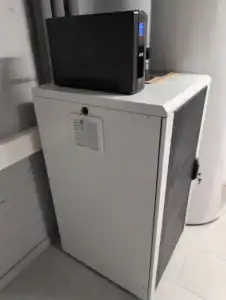
Thanks to my house electrician, I finally got precise identification of the rack:
- 19″ rack
- Brand: Schweizer Systemtechnik
- 21U (HE)
- Model: Easybox
I did what every responsible nerd does:
I dove into the manufacturer’s website and documentation.
Unfortunately, clarity regarding active fan cooling options was… suboptimal.
Either buried in PDFs or hidden in product codes decipherable only by procurement monks.
📞 Escalation Path: Call the Humans
So I did the unthinkable.
I picked up the phone and called sales.
Result:
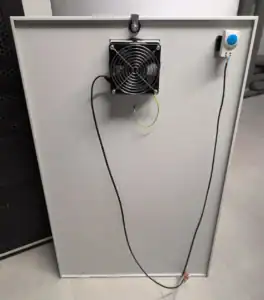
For roughly 120€, they shipped me a brand-new side panel equipped with:
- Integrated fan unit
- Built-in thermostat
Honestly? That’s a surprisingly reasonable upgrade path.
🌡️ Thermostat Tuning: Analog Configuration in a Digital World
The thermostat can be configured using a screwdriver — yes, the classic embedded-systems interface.
You simply dial in the temperature threshold at which the fan should activate.
Target threshold (initial test):
27°C

Mode:
Observe → Measure → Adjust → Repeat
I’ll start with 27°C over the next few days and monitor how the system behaves under load.
If needed, I’ll fine-tune from there.
🧠 Retrospective: Lessons Learned
Back when I originally purchased the rack, active ventilation simply wasn’t on my radar.
Classic early-stage homelab thinking:
- “It’ll be fine.”
- “The servers cool themselves.”
- “Heat probably rises somewhere else.”
Turns out:
- Switches still generate heat.
- Enclosed spaces accumulate thermal energy.
- Summer exists.
🚀 Conclusion: Small Upgrade, Big Peace of Mind
Was it a bit of effort? Yes.
Was it necessary? Debatable.
Does it improve long-term stability and reduce anxiety? Absolutely.
In the end, this wasn’t about raw performance.
It was about thermal resilience and operational confidence.
And let’s be honest — adding cooling infrastructure to your rack
is peak homelab evolution.
Next step: temperature logging and maybe a Grafana dashboard,
because if you can’t visualize it, did you even optimize it?