

Let’s be honest: firmware updates have historically been… a mess.
You download a mysterious ISO, write it to a USB stick, reboot into some arcane environment, pray to the silicon gods, and hope your machine doesn’t turn into a very expensive paperweight.
Enter fwupd — the gloriously nerdy, quietly revolutionary tool that brings firmware updates into the modern Linux ecosystem.
What Even Is fwupd?
At its core, fwupd is a daemon and command-line utility that allows Linux systems to update firmware in a sane, standardized way.
Yes, really.
Instead of vendor-specific nonsense, fwupd talks to your hardware using well-defined protocols and pulls firmware updates from a centralized service. Think of it as apt, but for the stuff that lives below your operating system.
Why This Matters
Firmware is the hidden layer of computing — BIOS/UEFI, SSD controllers, Thunderbolt chips, docking stations, and more. It’s critical, but historically painful to maintain.
fwupd changes the game by:
- Eliminating the need for bootable USB tools
- Providing a consistent update mechanism across vendors
- Integrating with your system package/update workflow
- Making firmware updates (almost) boring
And boring is good.
Installation (Because Nothing Exists Until It’s Installed)
On most modern distributions, fwupd is already there. If not, installation is trivial:
sudo apt install fwupd        # Debian/Ubuntu
sudo dnf install fwupd        # Fedora
sudo pacman -S fwupd          # Arch
If that command succeeds without drama, congratulations — you’re already ahead of 90% of firmware workflows from a decade ago.
Basic Usage
Here’s the usual ritual:
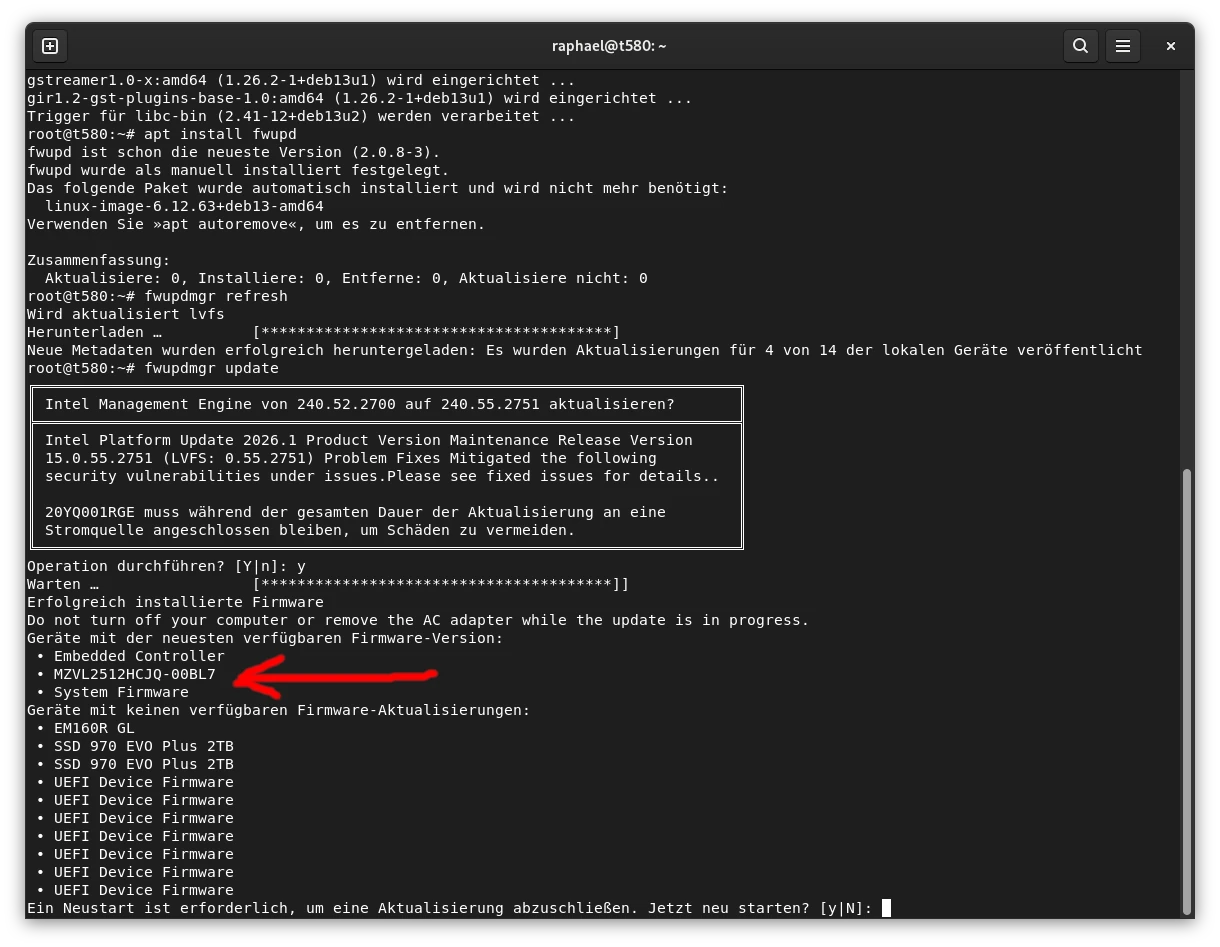
fwupdmgr get-devicesThis shows what fwupd can actually talk to. If your hardware appears here, you’re in business.
fwupdmgr refreshPull the latest metadata.
fwupdmgr updateApply updates.
That’s it. No ISO burning. No rebooting into cursed menus (well… sometimes one reboot, but still).
The Secret Sauce: LVFS
fwupd doesn’t magically invent firmware. It relies on the Linux Vendor Firmware Service (LVFS), where manufacturers upload signed firmware blobs.
The cool part? Vendors like Dell, Lenovo, and others actively support this ecosystem. That means your Linux laptop might actually get firmware updates first-class, not as an afterthought.
Does It Work Everywhere?
Short answer: no.
Long answer: it depends.
fwupd support requires vendor cooperation. Some hardware is beautifully supported; other devices remain stuck in the “download this Windows executable and suffer” era.
But the trend is clear: things are getting better.
Why Nerds Love It
- It replaces chaos with structure
- It turns black-box firmware into something observable
- It aligns low-level system maintenance with Linux philosophy
Also, there’s something deeply satisfying about running:
fwupdmgr update…and knowing your BIOS just updated without a single BIOS screen in sight.
Real-World Note
On my own Lenovo T580, fwupd regularly delivers firmware updates without any drama — the only thing I had to do was run a quick fwupdmgr refresh once to make sure the metadata was up to date, and after that it just worked.
Final Thoughts
fwupd isn’t flashy. It doesn’t render pixels faster or compile your code quicker.
But it quietly fixes one of the most annoying, fragmented parts of system maintenance — and that’s a big deal.
In a world where firmware updates used to feel like a side quest from 2007, fwupd makes them feel like just another Tuesday.
And honestly, that’s kind of beautiful.